

Key Takeaways
- Best templates and trackers for logging BCBA and BCaBA supervision hours
-
-
- Ripley
- MentraTrack
- BCaBA Fieldwork Hours Tracker
- BCBA® Fieldwork Tracker – Supervision Hours Log – 5th Edition
-
- Types of hours in the log
-
-
- Supervision hours
- Supervised hours
- Restricted hours
- Unrestricted hours
- Direct hours
- Indirect hours
- Cumulative hours
-
- What do supervisors log?
-
-
- Supervision hours provided in meetings
- Performance of RBTs and other juniors
- Fill in the necessary approval forms
- Sign for approval
-
- What do supervisees log?
-
-
- Total hours worked
- Activity descriptions
- Supervision hours or time spent interacting with the supervisor
- Cumulative total of hours
-
Overview — Tracking BCBA and BCaBA Supervision Hours
Creating and maintaining a thorough BCBA supervision hours log is a basic requirement for all behavioral therapists or ABA practitioners. Therefore, understanding how the logs work and where you can take a start is important. Below is a quick look at the best templates for logging BCaBA supervision hours, followed by a detailed guide for beginners.
|
Best Templates for Tracking BCaBA Supervision Hours |
|
| Ripley |
|
| BCaBA Fieldwork Hours Tracker |
|
| MentraTrack |
|
| BCBA® Fieldwork Tracker – Supervision Hours Log – 5th Edition |
|
What Does it Mean to Log Supervised/Supervision Hours as an ABA Therapist?
One of the various ABA therapist requirements, logging supervised and supervision hours, sits at the core. This logging is necessary for anyone who is preparing for the BCaBA or BCBA certification.
While having an applied behavior analysis bachelor’s degree is a necessity for becoming eligible for the BCaBA certification, you also need a minimum of 1,500 supervision hours. Therefore, an hour or fieldwork log is what helps you give documented proof of your eligibility.
Now, keep in mind that there are two types of fieldwork hours that you are required to log, while also creating a distinction between the two. These are described below:
|
Supervised hours |
Supervision hours |
| These are the overall total hours you have worked in the field as part of your ABA training, at any level including RBTs and BCaBA
Includes all activities such as direct client sessions and behavior assessments |
Subset of the supervised hours
Only includes activities where you interact directly with the supervisor, such as 1:1 sessions, feedback, observations, and case discussions |
|
For BCBA and BCaBA candidates, the board requires a minimum of 5% of your supervised hours to be supervision hours each month |
|
So, as you can see, the fieldwork hours can be complex to keep track of just by memory. More importantly, these hours have to be documented for your certification. Therefore, it is important to log or track these hours using a structured template or a digital tracker software. A clear and well-kept log can provide you with a detailed breakdown of the hours and your overall performance in the field.
Types of BCaBA Supervision Hours to Log
Before you start making a log or recording your fieldwork hours, make sure you can distinguish between the two broad categories: restricted and unrestricted. However, in some settings, these may also be referred to as direct and indirect hours.
| Type of Hour | Meaning |
| Restricted Hours | Direct client work; should not be more than 40% of total fieldwork |
| Unrestricted Hours | Indirect activities that build necessary skills and competencies for an ABA career |
| Direct Hours | Hands-on work with clients, such as behavior interventions — overlaps with and sometimes referred to as restricted hours |
| Indirect Hours | Work done about the client, mostly spent with the supervisor and collaborative work — overlaps with and sometimes referred to as unrestricted hours |
| Cumulative hours | The running total for however many hours you have logged. Often used to see how many hours remaining to become eligible for the certification |
Who Logs BCBA or BCaBA Supervision Hours? — ABA Therapist Requirements
Often, young individuals or entry-level professionals are confused about the documentation and keep wondering who does what. After graduating with a degree in behavioral health sciences or a related ABA field, you should be equipped with ample information about practical work. Therefore, in this section, we clarify who logs what, and when. Have a look:
Who Must Log Fieldwork Hours?
- Master’s students who are candidates for BCBA certification
- Bachelor’s students who are candidates for a BCaBA certification
- RBTs working under the supervision of BCBA/BCaBA
- Young professionals working under college-facilitated affiliation programs such as internships
Who Logs What?
Supervisors of RBTs and BCaBA must log the following:
- Supervision hours provided in meetings and case reviews
- Check total percentage of hours under supervision each month for BCaBA under training
- Sign off the final cumulative hours after review
- Fill any necessary verification forms
Supervisees who are also candidates of BCBA and BCaBA certifications should log the following:
- All or total supervised hours that include indirect and direct hours
- Specific supervision hours that are spent in interaction with the supervisor
- Running total hours or cumulative hours
- The percentage of supervised hours every month that are spent under supervision
RBT Certifications vs BCBA vs BCaBA — Complete Guide
Templates and Tools for Logging BCBA and BCaBA Supervision Hours
If you are enrolled in a ABA bachelor degree, you also need to prepare yourself for some practical requirements such as knowledge of hours log sheet. Find below the top templates and trackers for logging BCBA and BCaBA supervision hours.
Ripley — Most Popular Tracker
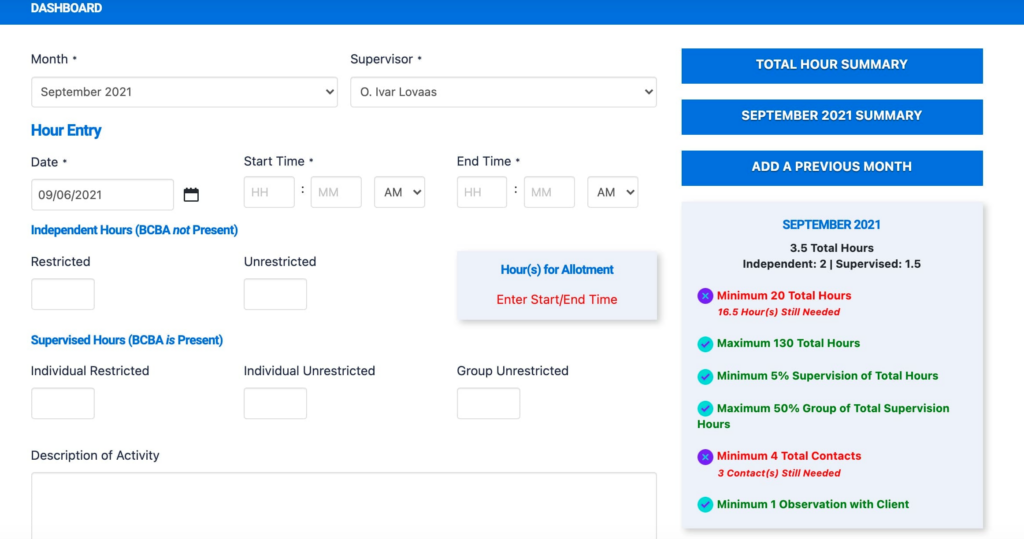
When you are in search of the best templates and hour trackers for logging supervision hours as an ABA therapist requirement, Ripley is one of the recurring names. It is extremely popular amongst supervisors and supervisees alike.
Firstly, the tool offers a user-friendly interface packed with video demonstrations and guides to help you get started. Moreover, it has dedicated dashboards for supervisors and supervisees — so you can use it not only to track RBT fieldwork hours, but also for self-tracking.
In addition to this, the tool has many useful features and functions that can make your life easy by streamlining this process, such as:
- Simple total hours calculator
- Quick view option for the current month
- Fieldwork hours summary tells how many hours still needed
- Description box for important notes
- Easy editing, deleting, and adding hours for revision
- Thorough monthly summaries
BCaBA Fieldwork Hours Tracker — Best Excel and Google Sheets Template

Many beginners or entry-level behavioral therapists struggle with the extensive documentation and paperwork that is required of them. However, tools like Google Sheets and MS Excel are something they are all familiar with. Therefore, using a BCaBA fieldwork hours tracker that integrates with Sheets or Excel is a great starting point.
This template is valid through the 2027 BACB standards. Moreover, it comes with pre-filled tabs that makes it easier for entry-level professionals to ensure everything is in place. Furthermore, the dashboard includes all important data and information such as hours summary, percentage remaining, and months remaining. It even lets you easily distinguish between the type of hours ,including restricted and unrestricted.
Overall, here are some features that make it the best clinical supervision hours log template for tracking fieldwork hours using Google Sheets or Excel:
- Pre-filled tabs ensure proper compliance
- Easy to view monthly summaries and hour breakdowns
- Includes checklists to ensure compliance
- Print-friendly format for professional documentation
MentraTrack — Best Automated Tool
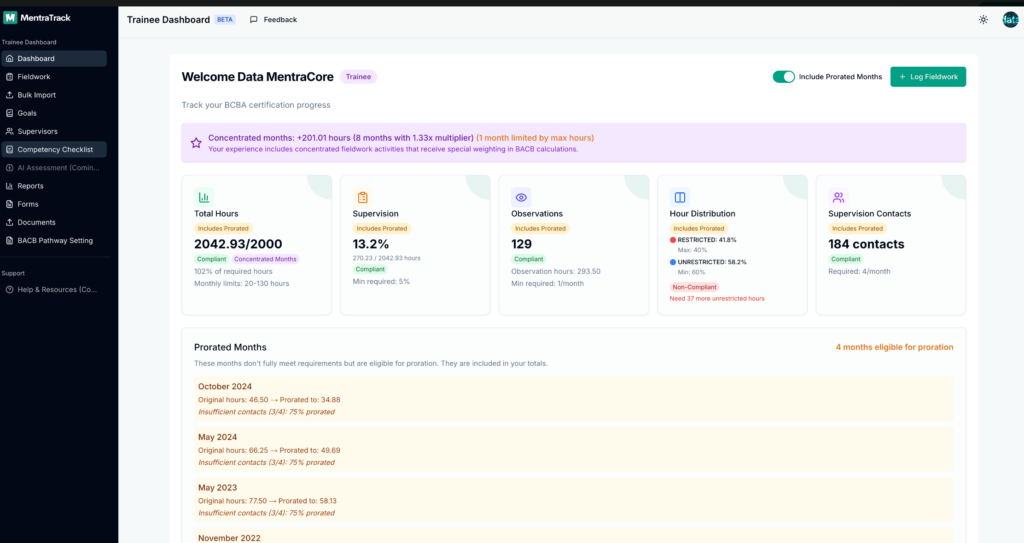
With real-time automation, the MentraTrack is one of the leading ABA fieldwork BCBA and BCaBA supervision hours tracker in the industry. It is packed with outstanding functions and features, especially its ABA-aligned, BACB-compliant framework.
Moreover, the tracker offers several functions that streamline the overall day-to-day administrative work. For example, there is a trainee overview that lets you quickly go over your subordinate’s work and progress.
Additionally, the tool also features an approval feature, along with activity and interactions monitoring, that further makes this tracker a cohesive management tool. We strongly recommend this tool for BCBA supervisors who have multiple BCaBA and RBT certified individuals working under them.
It is also excellent for supervisors who wish to train their juniors efficiently, thanks to the “setting goals” feature that not only allows easy performance tracking but also ensures real-time feedback with easy performance review.
Here is an overview of some notable features:
- Advanced performance analytics
- Easy hours summary with the monthly view
- Smart signatures and streamlined management
- Detailed hour breakdowns
- Mobile-friendly for easy remote access
- Smart hours distribution such as restricted and unrestricted hours
BCBA® Fieldwork Tracker – Supervision Hours Log – 5th Edition — Best for Single Supervisor
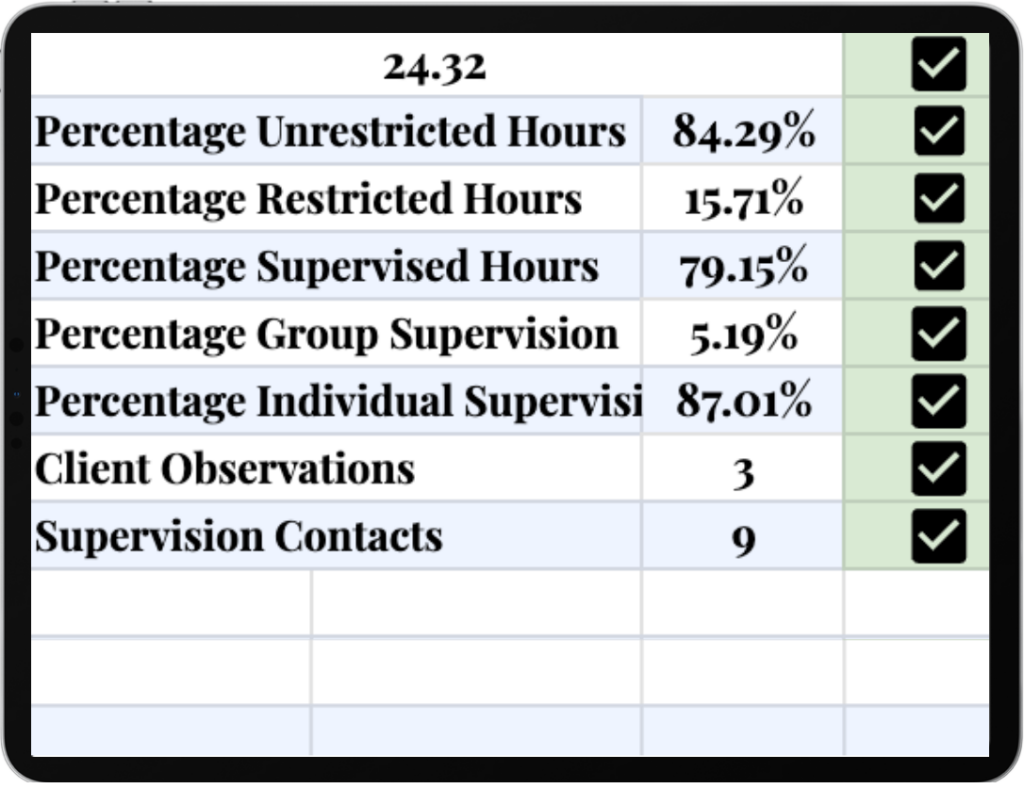
If you are tracking your own fieldwork BCaBA supervision hours, preparing for a BCBA or BCaBA exam, then this fieldwork tracker template by Beltran’s Behavior Basics is the best choice.
Firstly, this is also a template to use on Google Sheets or MS Excel. Therefore, the template is easy, user-friendly, yet quite detailed. Moreover, the template lets you input activity logs and it automatically updates. It also quickly updates the total hours and the summary to instantly tell you what else needs to be done.
It also features detailed summaries for all types of BCBA or BCaBA supervision hours, detailed breakdowns, and counting down the hours left to go. However, since it is a simple template rather than a tracker tool, there is a lack of additional features and documentation features such as short notes, performance analytics, and so on. Here is an overall look at the top features:
- Extremely user-friendly
- Best for self-monitoring
- Works for single-supervisor work setting
- Easy and automated cumulative total hours
- Monthly summary
- Hours countdown
- Compliant with BACB framework
Tips to Efficiently Log BCBA and BCaBA Supervision Hours
You can make the process for logging your BCBA or BCaBA supervision hours an easy task if you follow the right strategies and tips. So, to help you take the right start, here are some important tips to keep in mind.
Log Hours Daily
Many new supervisors and supervisors tend to keep the logging of hours for the end of week or sometimes end of month. While this saves them from the day-to-day hassle, it becomes a burden once all the work starts to pile up. Moreover, this also creates more room for errors such as forgetting how many hours you worked. On the other hand, logging your work hours every day can ensure:
- You don’t miss out on any activity including meetings and discussions
- You can easily add notes and description from memory
- You remember deeper details for each activity
- You don’t have to rush at the end of every month to gather data
- You can track your performance daily, weekly, and monthly very easily
- You create a strong and disciplined routine that can help your professional growth
So, try filling in the log sheet by the end of every activity or the end of the day.
Create Short Notes
Typically, the best log sheet templates and tracker tools come with a lot of quantitative information and data. So, this sometimes leads to BCBA and BCaBA supervision hours to stay restricted to just numbers.
However, almost all tools, especially Excel sheet templates, have a room for creating short notes, comments, or adding descriptions. This can help you achieve more clarity and cohesion in your sheet for future reviewing.
Moreover, adding short notes or descriptions can ensure that you remember exactly what was done, as well as use it as evidence for audits when necessary. This is also a great convenience for your supervisor as they get more insights to each of your logged activities.
Periodically Review Your Log
Even if you use a digital tracker, the information or data you input is being entered manually. Therefore, there is still room for human error to occur. All trackers for BCaBA supervision hours offer you the option to revise or edit any entry you want. Therefore, we strongly recommend reviewing your log every end of week or every 2 weeks. This can help you in various ways, such as:
- Lets you catch errors before it reaches your supervisor
- Can ensure accurate calculation for cumulative hours
- Ensure an accurate measure of how many hours you have covered and what’s still left
- Shows you the right balance between restricted and unrestricted hours so you can plan your work accordingly
Bottom Line
In conclusion, tracking and maintaining a log sheet of your fieldwork hours is an essential part of your day-to-day professional work. Without a well-maintained record, you will find it difficult to become eligible for a higher level certification. Therefore, following the official BACB handbook, along with the aforementioned tips and best templates, you can get a better handle at tracking your fieldwork hours. If you are only starting your professional journey, don’t forget to get some degree-related advice to make the best decision for your long-term career.
Frequently Asked Questions
How many unrestricted hours are there for BCaBA?
For a BCaBA certification, you need at least 60% of the supervised hours to come from unrestricted activities. Unrestricted activities include any activity that goes beyond the one-on-one interaction with the clients. So, working on a behavior improvement plan, reviewing client progress, or attending training and consultations count as unrestricted hours.
How many unrestricted hours are there for BCBA?
For BCBA, at least 60% of the supervised hours or total fieldwork should be dedicated to unrestricted activities that may include assessments, plan development, mentoring, and collaborating with other department specialists. The total hours required for a BCBA are at least 2,000 hours of fieldwork, so 60% of that would mean at least 1,200 hours of unrestricted activity.
Does maintaining a BCBA/BCaBA hours log help us get a certification?
Yes, absolutely! Maintaining a professional and formal record of your fieldwork hours is a basic compulsion for becoming eligible and appearing for the BCBA/BCaBA examination. A well maintained hour log is an official document that can be used as a proof of your fieldwork experience. Here are some benefits of maintaining a BCBA/BCaBA hour log:
- Used as a proof
- Ensures successful audits
- Helps your supervisor easily verify the work
Who is responsible for tracking my fieldwork hours as a BCBA/BCaBA candidate?
The supervisee keeps track and records all their activity and fieldwork hours. You are responsible for maintaining accuracy and ensuring frequent reviews. Your supervisor is only responsible for reviewing the log, going through it before signing approval and filling verification forms.
Do I need to log my hours daily or monthly?
You should aim to log your fieldwork hours daily, or at least very frequently such as weekly. Doing this every day can help you keep the track up-to-date and ready to get approval or verification from your supervisor. Do not leave the log sheet for the end of month, as it can lead to piling up of work and more room for errors.